
















SEE THE FUTURE TODAY:

Why InvisiTasking?

InvisiTasking is a technology that can be embedded in Windows applications, utilities, programs or processes of any type to enable these to run using otherwise idle resources that are normally blocked from use while a process awaits availability of the machine as a whole before being allowed to run. The result is such a great improvement in the utilization of individual resources that everything gets done faster despite more resources being consumed. Here’s how this seeming contradiction is resolved and remarkably improved performance is achieved.

Since the 1960s, the scheduler in the operating system has been considered sacred and untouchable. In view of the dramatic shift in the balance of performance (CPU vs. memory vs. disk vs. network) since then, one of our senior technologists questioned this consideration and opened a whole new world of possibilities. A thorough worldwide patent search confirmed that InvisiTasking is an entirely new concept in computer resource scheduling, what is known as a pioneer patent, that is to say a fundamentally new invention—one that creates an entirely new field of technology or solves a long-standing problem in a groundbreaking way. InvisiTasking enables a program to run full speed with zero impact on other processes—no overhead at all. It does this by selectively allocating individual resources to each available process, not just dedicating the whole machine for each time slice, but providing only the individual resources (CPU, memory, disk, or network) that each process needs at that moment. The approach used to do this is so innovative that multiple simultaneous processes often run faster than they do in a standalone environment.

SDK Integration Process:

  1. Sign NDA and receive SDK and demo tools.
  2. Conduct initial test code implementation with our technical team ensuring your success.
  3. Using the InvisiTasking SDK source code analysis tools, determine the proper locations for InvisiTasking Service calls in your application.
  4. Test the restructured code on representative hardware platforms.
  5. Finalize Licensing Agreement.
  6. Release the product and enjoy the benefits of InvisiTasking.
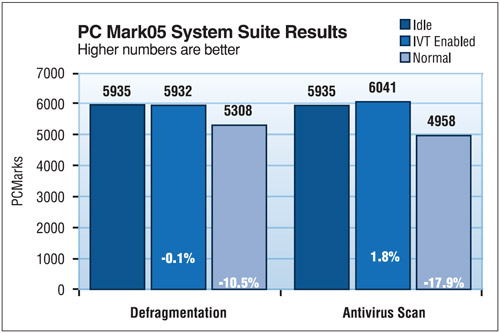
InvisiTasking on Defragmentation and Antivirus Scanning
InvisiTasking on File Copy and Prime Number Generation

EXPERIENCE InvisiTasking TODAY

InvisiTasking is far more advanced than any previous low priority I/O approaches that do “I/O throttling” in an effort to reduce resource conflict.

KEY BENEFITS OF InvisiTasking

  • Zero program overhead – yes, zero

  • Field proven on millions of computers

  • Straightforward integration

  • All Windows 64-bit virtual and physical systems are supported:

    • Windows 7, Windows 8, Windows 8.1, Windows 10, Windows 11
    • Windows Server 2008 R2, Windows Server 2012 (or R2), Windows Server 2016, Windows Server 2019, Windows Server 2022, Windows Server 2025

InvisiTasking – How it Works

Instead of letting the operating system scheduler allocate the entire computer system to each process, one at a time, in round-robin fashion, InvisiTasking causes the system to allocate its various resources (CPU, memory, disk and network) separately to the processes that need each one. This allows overlapping use of separate resources, not just reducing system overhead, but eliminating it altogether.

FREQUENTLY ASKED QUESTIONS

InvisiTasking is a true breakthrough technology that can be embedded in Windows applications, utilities, programs or processes of any type to enable these to run using otherwise idle resources that are normally blocked from use while a process awaits availability of the machine as a whole before being allowed to run. The result is such a great improvement in the utilization of individual resources that everything gets done faster despite more resources being consumed. Here’s how this seeming contradiction is resolved and remarkably improved performance is achieved for processes that must run frequently or continuously.

Instead of letting the operating system scheduler allocate the entire computer system to each process, one at a time, in round-robin fashion, InvisiTasking causes the system to allocate its various resources (CPU, memory, disk, and network) separately to the processes that need each one. This allows overlapping use of separate resources, not just reducing system overhead but eliminating it altogether.

Since the 1960s, the scheduler in the operating system has been considered sacred and untouchable. In view of the dramatic shift in the balance of performance (CPU vs. memory vs. disk vs. network) since then, one of our senior technologists questioned this consideration and opened a whole new world of possibilities. A thorough worldwide patent search confirmed that InvisiTasking is an entirely new concept in computer resource scheduling, what is known as a pioneer patent, that is to say a fundamentally new invention—one that creates an entirely new field of technology or solves a long-standing problem in a groundbreaking way— an entirely new concept in computer resource scheduling that no one ever thought of before.

Only for the better. And we can prove it. InvisiTasking-enabled jobs have no impact on the user and primary system applications. Benchmark testing with PC Mark actually shows an improvement over standalone speed in benchmark scores with InvisiTasking-enabled programs running. This may seem counter-intuitive but it is true.

InvisiTasking enables a program to run full speed with zero impact on other processes—no overhead at all. It does this by selectively allocating individual resources to each available process, not just dedicating the whole machine for each time slice, but providing only the individual resources (CPU, memory, disk, or network) that each process needs at that moment. The approach used to do this is so innovative that multiple simultaneous processes often run faster than they do in a standalone environment.

All Windows 64-bit virtual and physical systems are supported:

  • Windows 7, Windows 8, Windows 8.1, Windows 10, Windows 11
  • Windows Server 2008 R2, Windows Server 2012 (or R2), Windows Server 2016, Windows Server 2019, Windows Server 2022, Windows Server 2025

No. InvisiTasking currently supports only the Microsoft® OS environment.

Originally developed in 2011 and in continuous deployment ever since, InvisiTasking has proven its stability, maturity and return on investment.

Since InvisiTasking is such a breakthrough in resource utilization, it is important for us to work closely with the developer to ensure his program is structured to take advantage of the power of InvisiTasking. However, a simple demonstration program can be “InvisiTasked” usually in less than one hour. Our engineers will work with you to ensure that the full potential of InvisiTasking is realized on your application.

Remarkably well. Most systems are underutilized, but even heavily used servers usually have many wasted resources due to latencies in disk or network access. InvisiTasking includes adjustable thresholds and parameters to apply different criteria to individual jobs when needed. For example, some jobs need to complete steps within a certain time period. If there are not enough available resources to do this, InvisiTasking will automatically put the job into a foreground resource scheduling mode until the program executes within its time requirements and then revert it back to InvisiTasking mode.

Yes. “Foreground” applications such as word processing, desktop publishing, web browsers, and real-time messaging apps would not benefit from these resource management techniques. However, some of the plug-ins for real-time user apps could benefit from InvisiTasking. For example, a media or graphics rendering support application could harness the unused CPU cycles of the local machine.

The most obvious candidates are programs that are deliberately scheduled to run after hours due to excessive resource consumption or ones that typically run in the background during working hours. The most suitable candidate is a scanning process, such backup-related or data compliance applications, antivirus, expert systems, database indexing, or behavioral analysis technologies. An important point to note here is that some real-time technologies, such as on-access scanners, may need to be architected differently to take advantage of InvisiTasking, but this could result in a major reduction in overhead. One example of this would be scanning new emails in the background on the email server as a primary protocol and only performing on-access scans if the user requests an attachment before the server has had the chance to its background scan. The net result would be a more efficient use of server resources and a far more responsive user experience.

Request our free Information Kit by filling out this form. Or simply send an email to contact@invisitasking.com and we will set up a personal briefing with one of our technical experts. We may then execute a Mutual NDA and begin the process of making your program overhead disappear.

EXPERIENCE InvisiTasking TODAY

InvisiTasking is far more advanced than any previous low priority I/O approaches that do “I/O throttling” in an effort to reduce resource conflict.

TESTIMONIALS

With the introduction of InvisiTasking in Diskeeper products, we knew we were onto something…

“Absolutely, I do recommend Diskeeper to others. Diskeeper with InvisiTasking is absolutely AWESOME!  My system performed much faster with early versions of Diskeeper.  My system unbelievably performed even faster yet with Diskeeper using InvisiTasking!

Bill Hahn, IBM Sr. Consulting Certified Software IT Specialist, Dev. Tools and Server Middleware Evangelist

“Diskeeper 2008 Server edition fully defragments in a single pass. That’s very good, but not amazing. InvisiTasking is the first truly “Set It and Forget It”® product that can run full time. The ability to defrag using only idle process time, with NO impact to system performance, is again, very good.

“Add I-FAAST and access time to system files is cut in half! So you have a product that nearly doubles the performance, completely defrags, and does it all in the background; now THAT’S AMAZING!”

David Irwin, MCSE, CNA, A+, NTCIP, Sr. Infrastructure Engineer, Phoenix, AZ.

“I’m a professional IT consultant, and am very selective about my utilities. I couldn’t be happier with Diskeeper. It is by far the best defragmentation software I have come across. You can’t even tell when it’s running thanks to InvisiTasking.

Paul R. Dillinger, President, CRSG Solutions Group, S.A.

I am very impressed with the InvisiTasking technology. It’s so remarkably transparent that I had to hunt for it using Task Manager to make sure that it was actually running as a service on my machine! I am a digital photography enthusiast and a highly advanced amateur photographer. I put great demands on my various computers and I am very pleased with my Diskeeper purchase, which is running on my newest and most mission-critical system.  Yes, I would recommend this technology very highly to those who wish to keep their systems healthy and at optimum performance levels at all times.”

Bill Tomcsanyi, IT Director, Major Los Angeles County Hospital

“As a photographer, I often am taxing my machine already. InvisiTasking keeps my system running at top speed with me never noticing Diskeeper working.

Learn how InvisiTasking can enable your application to perform its work invisibly!

Contact InvisiTasking technology licensing now at contact@invisitasking.com

CONTACT InvisiTasking TODAY

Craig Jensen

Submit this form below

    Your Name:

    Your Email:

    Your Message: